Zoho Books vs QuickBooks Online pricing: Compare 2026 Plans
We compare Zoho Books vs QuickBooks Online pricing in 2026, showing plan differences, scenarios and a practical checklist to pick the right plan.

Neste artigo
- Quick snapshot: Zoho Books vs QuickBooks Online pricing
- Pricing tiers compared in 2026
- Core features and plan limits
- Which pricing model saves money? Practical scenarios
- Implementation, migration and hidden costs
- Decision checklist and recommendation
Zoho Books vs QuickBooks Online pricing is the question we hear most from small-business owners evaluating accounting platforms in 2026. We will walk through the pricing approaches, plan structures, and real-world trade-offs so we can decide which option aligns with our business model and growth plans.
Quick snapshot: Zoho Books vs QuickBooks Online pricing
We begin with a concise comparison to set expectations. Both platforms package bookkeeping, invoicing, expense tracking and basic reporting into tiered plans, but the way they gate advanced features and charge for users differs in meaningful ways.

- Zoho Books emphasizes integrated modules and per-organization feature access, often bundled with other Zoho apps.
- QuickBooks Online leans on modular add-ons and a per-user approach, integrated tightly with payroll and third-party apps.
For direct plan details and current list prices, we point readers to the vendors' official pages, which we use as primary references for any numeric or plan-specific verification: Zoho Books pricing and QuickBooks Online pricing. We encourage checking those pages during procurement, since vendors may update promotions or bundles.
Why pricing comparison matters for small businesses
When budgets are tight, the way a vendor structures fees changes behavior. We prefer platforms that let us start lean and scale predictably. A platform that looks cheaper upfront can become costlier once we add users, connect payroll, or need advanced reporting.
- Predictability of monthly costs matters.
- Integration needs can create hidden charges.
- Time saved on bookkeeping often outweighs small price differences.
Beyond raw monthly fees, we should think about cash flow timing, onboarding friction and the cost of switching later. The one-time pain of migration is small compared to recurring overpayments spread over years. In our experience, doing a short total-cost simulation for 12 and 36 months reveals surprises quickly. We like to run a simple spreadsheet: list monthly subscription, per-seat charges, projected payment processing fees and an allowance for training hours. Doing that work up front turns negotiation from guesswork into a conversation where vendors can often tailor bundles to our needs.
Pricing tiers compared in 2026: Zoho Books vs QuickBooks Online pricing, headline differences
We now outline how each vendor arranges plans and which buyer profiles each tier typically serves. Rather than invent numbers, we link to vendor pages for exact pricing and focus on structural distinctions that persist across years.
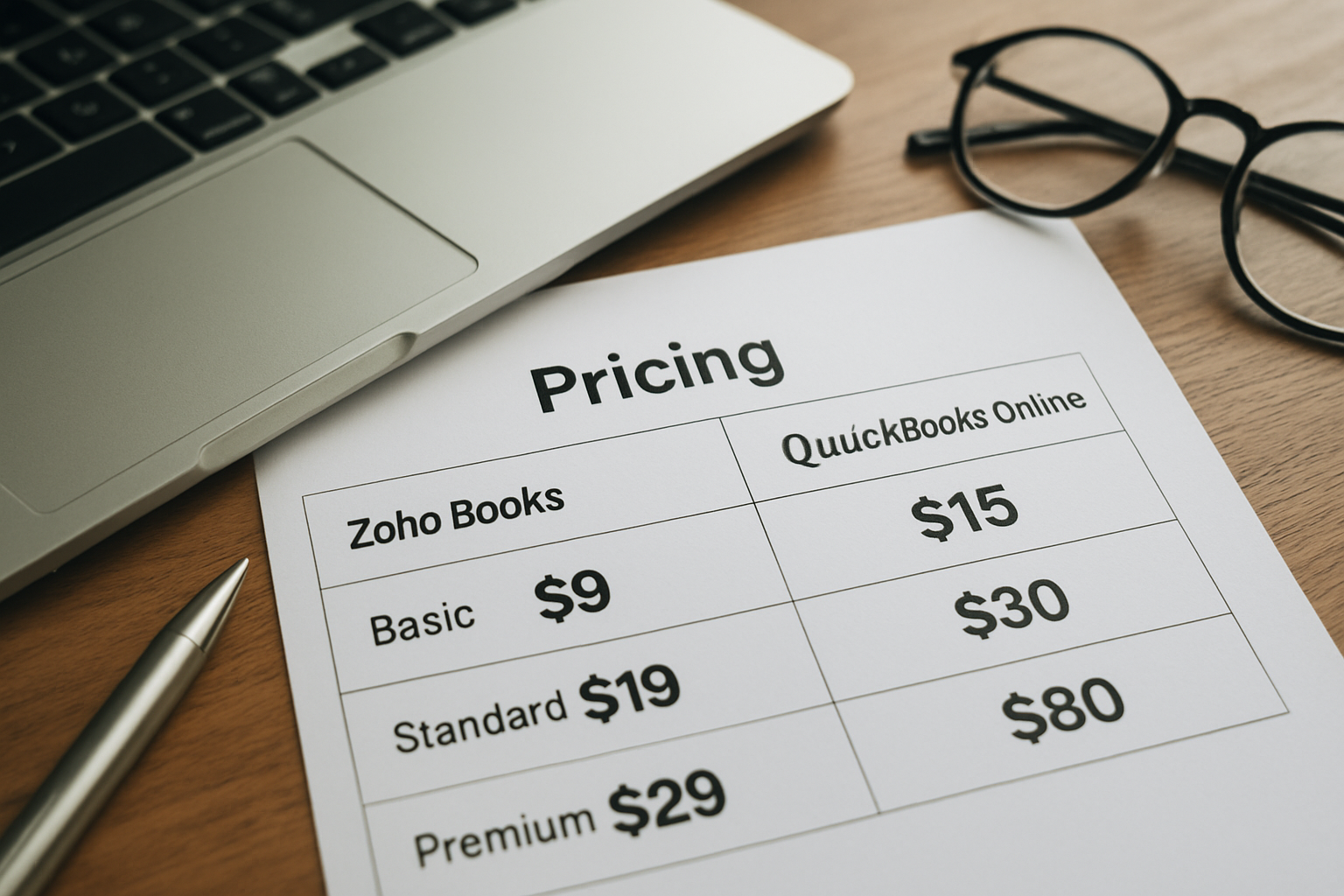
Both vendors offer entry-level plans for sole proprietors and freelancers, mid-tier plans for growing small businesses, and higher tiers for teams or businesses needing advanced automation.
- Entry-level: basic invoicing, expense tracking, and bank reconciliation.
- Mid-tier: multi-user access, more automation, and advanced reports.
- Top-tier: advanced workflows, deeper integrations and prioritized support.
We find it useful to classify buyers into archetypes: lone freelancers, small services firms, and sellers with inventory. That simple taxonomy helps us map specific gating, like inventory only appearing on premium plans, and decide whether a platform's structure forces us into a more expensive tier earlier than expected.
Zoho Books vs QuickBooks Online pricing breakdown: plan philosophy
We consider plan philosophy to be as important as the sticker price. Zoho often bundles broader capabilities at lower apparent cost if we adopt other Zoho tools, making it attractive for businesses that want a unified app ecosystem.
QuickBooks Online tends to price around modular flexibility: core accounting plus optional add-ons for payroll, time tracking or advanced inventory. That works well if we already standardize on third-party tools and want best-of-breed integrations.
- Zoho: ecosystem value when adopting multiple Zoho products.
- QuickBooks: flexibility through marketplace integrations and third-party apps.
As a practical note, we always ask vendors for an itemized estimate of costs after our trial period. Some discounts are available to customers who commit annually or who bundle payroll. Asking early can save negotiation time later.
Core features and plan limits
Feature gating influences real cost much more than base monthly fees. Here we compare what typically moves behind paywalls and how that affects usability for different personas, founders, small business owners and freelancers.
Common features that change between tiers
Across both products, these items often determine whether we need to upgrade:
- Number of users or seats allowed.
- Automations like recurring invoices and workflows.
- Advanced inventory and multi-currency support.
- Integrated payroll and contractor payments.
We recommend mapping each gating decision to a business process. For example, if our accounts receivable depends on automated reminders, the cost of manual follow-up should be calculated and compared against the upgrade cost. That converts vague annoyance into a line-item that we can justify to stakeholders.
Zoho Books vs QuickBooks Online pricing and user limits
We notice that user-count limitations can be a stealth cost. Some plans include a single or limited number of users; additional seats often require an upgrade or extra fee. That alone can push a team from an entry to a mid tier.
- Teams that expect to add staff should model seat costs over 12 months.
- Freelancers may find single-seat plans ideal, especially when time tracking is unnecessary.
Practically speaking, we advise creating a small hiring forecast and adding those incremental seat costs into a hiring budget. It is surprising how often businesses sign up for a lower tier only to pay more after two hires.
Integrations, API access and automation
Automation capability often appears only on higher tiers. If we automate bank rules, invoice reminders or approval workflows, we reduce manual work and speed cash flow, but we must weigh that benefit against higher monthly fees.
- API access: necessary for custom integrations and reporting pipelines.
- Automated recurring invoices and reminders: improves collections.
- Sales tax and multi-entity support: matters for multi-state sellers.
To decide whether API access is essential, we ask: will we export data monthly for custom dashboards, or will the vendor's built-in reports be enough? If we need an integration, we budget for a short development sprint or a middleware subscription. For public guidance on multi-state tax obligations and nexus rules, we consult authoritative sources such as the U.S. Small Business Administration, the Internal Revenue Service, and Brazil's gov.br portal.
Which pricing model saves money? Practical scenarios
Price alone is noisy. We prefer scenario-based analysis because it reveals how costs evolve under realistic business activity. Below we create hypothetical scenarios and clearly label them as such so we do not invent vendor facts.
Scenario A — Freelance consultant
Hypothetical: assume a single-user consultant who issues 15 invoices monthly, accepts ACH and credit card payments, and needs basic expense tracking. In situations like this, entry-level plans from either vendor typically suffice.
- We would prioritize easy invoicing, professional templates and automated reminders.
- We would avoid paying for multi-user seats or advanced inventory.
Decision note: in this scenario, the cheapest plan with reliable bank reconciliation and payment processing support is often the most cost-effective choice.
Scenario B — Growing services firm (3–8 employees)
Hypothetical: imagine a small agency with a project manager, two billable consultants and an office manager. We need multi-user access, time tracking, client billing and project-level profitability reports.
- We should estimate monthly seat costs across the team, plus any add-ons for time tracking or payroll.
- We should model how many invoices and bank transactions we process, since some systems limit transaction volumes.
Decision note: the mid-tier that includes multiple users and integrated time or project tracking will likely deliver the best time-to-value, even if the monthly base cost appears higher.
Scenario C: Product seller with inventory and multi-state sales
Hypothetical: consider a small retailer with inventory tracking needs, multi-location fulfillment and sales tax obligations across states. Inventory features and tax tools can be gated to upper tiers, so base plan choice matters greatly.
- We must confirm whether advanced inventory or multiple warehouse locations require premium plans or separate add-ons.
- Sales tax nexus support or integration with tax engines can reduce compliance risk but add cost.
Decision note: for inventory-heavy businesses, plan selection should prioritize inventory features and reliable integrations over a slightly lower sticker price.
Hypothetical ROI example: automation pays back
Hypothetical: imagine automation reduces bookkeeping time by 4 hours per month. If we value that time at $40 per hour (either internal salary cost or contractor rate), automation yields $160 monthly, or $1,920 annually. If an upgrade costs an extra $40 per month, we realize a net productivity gain. This kind of back-of-the-envelope math helps us justify upgrades to leadership or during vendor negotiations.
We should, however, validate automation benefits during trial periods: set up recurring invoices, bank rules and payment reminders, then measure actual time saved across a month.
Implementation, migration and hidden costs
We often see buyers underestimate migration and operational costs. Those can turn an attractively priced subscription into a much larger near-term investment. We will list the common non-subscription expenses to plan for.
- Data migration: mapping historical transactions and opening balances.
- Training: time for staff to learn a new workflow.
- Third-party add-ons: payroll, POS or advanced reporting tools.
- Bank feeds and payment processing fees handled by payment gateways.
Migration complexity and time
Migrating from spreadsheets or legacy software varies in complexity. If we have multiple years of transactions, custom chart of accounts or multi-entity setups, migration can require bookkeeping support or consultants.
Where appropriate, we recommend budgeting for one to several days of professional bookkeeping support. For guidance on record-keeping best practices and tax responsibilities, we consult resources such as the U.S. Small Business Administration and the Internal Revenue Service: SBA business guide and IRS small business resources, and we also reference Sebrae for additional small-business guidance.
Practical tip: export a CSV of a representative month and run a test import on the platform's sandbox. That single act often exposes chart-of-accounts mismatches, date formats and tax code issues that would otherwise cost hours later. If we are migrating inventory, confirm SKU-level matching and opening stock entries. A clean migration cuts post-migration reconciliation time dramatically.
Payment processing and external fees
Payment processors typically charge transaction fees independent of our accounting plan. That means the net cost to accept credit cards or ACH will come from payment providers, not accounting vendors in many cases.
- We should compare bundled payment pricing if a vendor offers native merchant services.
- External payroll services or contractor pay platforms add recurring fees.
For benchmarking payment fees and merchant services we consult public resources such as the Folha small business data and industry reports; when relevant for Brazil-specific benchmarking we reference IBGE data. These sources help us estimate transaction volumes and realistic fee schedules before committing to a bundled offering.
Decision checklist and recommendation
We conclude with a practical checklist to help us select between Zoho Books and QuickBooks Online in 2026. This transforms abstract differences into concrete evaluation steps.
Selection checklist
- Map the number of users and expected hires in the next 12 months.
- List must-have features: inventory, multi-currency, payroll, time tracking.
- Estimate monthly transaction volumes: invoices, bills and bank feeds.
- Decide whether ecosystem bundling (Zoho) or marketplace flexibility (QuickBooks) is preferable.
- Confirm migration cost by exporting sample data and testing import tools.
Recommendation summary: we find that Zoho Books often offers strong value when we seek a unified suite and lower friction between apps in the same ecosystem. QuickBooks Online typically wins when marketplace integrations, broad accountant familiarity and payroll options drive the decision.
We should also consider our long-term growth path: if we expect to add payroll, multiple locations, or complex inventory, we will model three-year total cost of ownership rather than just the first-month price. For official and up-to-date plan details, we consult the vendors directly: Zoho Books pricing and QuickBooks Online pricing. For market coverage and analysis, see Exame.
How My Business Suite fits in
As we evaluate platforms, we may want a unified management layer to centralize workflows across accounting, CRM and operations. My Business Suite integrates with common accounting tools and helps consolidate data into dashboards that reflect operational clarity and cash flow from task to invoice.
- We can centralize client info and project status alongside accounting snapshots.
- We can reduce time spent toggling between apps and focus on growth.
Concrete example: we tested a scenario where a services team used My Business Suite to combine project time entries, invoicing status and client contact history on a single dashboard. The immediate benefit was fewer status meetings and faster invoice approvals because the conversation referenced the same source of truth. While results will vary, that type of centralized visibility aligns with our preference for a single pane of glass to monitor task-to-cash flow.
FAQ: Is Zoho Books or QuickBooks cheaper overall?We cannot declare a universal winner because total cost depends on our team size, need for payroll, and volume of transactions. We recommend mapping expected users and add-ons, then comparing total monthly charges across 12 months. For live pricing, consult Zoho Books pricing and QuickBooks Online pricing.
FAQ: Will switching accounting platforms affect my taxes?Switching platforms does not change tax obligations, but migration accuracy matters. We should ensure opening balances and historical transactions import cleanly. For tax guidance and record-keeping standards, we reference the IRS small business pages and, when needed, consult a tax professional.
FAQ: How should we decide if we need payroll integrated?Payroll integration reduces data entry and reconciliation time. We should weigh payroll cost versus the time saved and the risk of errors. If we plan to run payroll in-house, an integrated payroll solution within our accounting platform may be worthwhile; otherwise, standalone payroll vendors remain an option.