My Business Suite vs Zoho One: Differences & Pricing 2026
A hands-on 2026 guide comparing My Business Suite vs Zoho One: features, integrations, user experience and pricing insights for small businesses.
In this article
- Introduction
- My Business Suite vs Zoho One , Feature Comparison
- My Business Suite vs Zoho One , Pricing & ROI
- Integrations, Scalability & Security
- Which Business Should Choose Which
- Implementation Checklist & Next Steps
We begin with a clear statement: this article compares My Business Suite vs Zoho One so that we can help small business owners decide which unified business hub suits their goals in 2026.
Introduction
We know that choosing a business management platform feels like picking the engine for a long road trip: the choice shapes speed, comfort and the number of stops we need to make along the way.

We write from the perspective of teams that run micro and small businesses, startups and independent consultants, and we center practical trade-offs rather than marketing slogans.
We will cover features, pricing, integrations, security posture, user experience, and a pragmatic implementation checklist so that we can reduce risk and increase speed to value.
- We outline the comparison approach and the decision criteria we recommend.
- We highlight where My Business Suite is designed to shine for tight teams and Client-Centric Efficiency.
- We examine where a broad-suite provider like Zoho One positions itself in 2026.
My Business Suite vs Zoho One , Feature Comparison
We start by breaking down core modules and how those modules map to everyday workflows for founders like Maria, small business owners like Sarah, and freelancers like David.
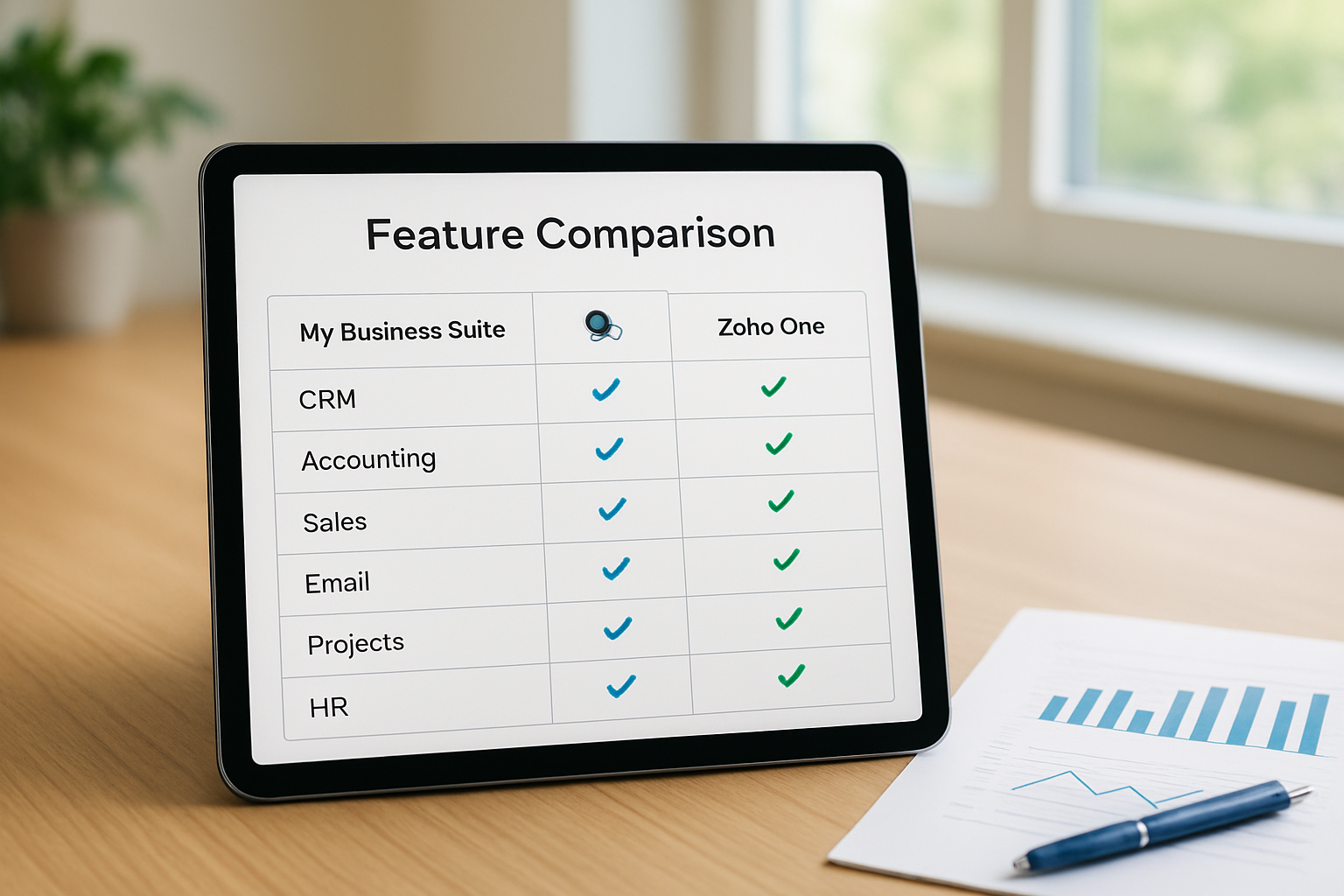
My Business Suite vs Zoho One , Core Modules at a Glance
We list the common functional areas that most small businesses need and compare capabilities in a neutral, utility-focused way.
- Customer Relationship Management (CRM): We assess lead capture, contact history, and automated follow-ups.
- Invoicing and Payments: We evaluate billing workflows, recurring invoices and payment reminders.
- Project & Task Management: We check task assignment, timelines and visibility across teams.
- Financial Tracking & Reporting: We look at expense tracking, cashflow snapshots and standard reports.
- Communications & Automation: We measure built-in email, SMS workflows and templates.
We emphasize that My Business Suite is built as an all-in-one tool from the ground up for small teams, and we describe how that translates into fewer toggles between apps and less administrative friction.
We note that a platform strategy that centralizes Task-to-Cash Flow reduces cognitive load for small teams, and we show how design choices matter in daily use.
Feature Details, What We See in Everyday Use
We describe features in practical terms so that we can show what each module enables on a Monday morning.
- CRM: We see unified contact timelines that combine emails, messages and invoices so follow-ups feel natural rather than fragmented.
- Automation: We see workflows that trigger automated proposals, payment reminders and client onboarding sequences that save hours each week.
- Dashboards: We see consolidated dashboards that reveal overdue invoices, project bottlenecks and customer touchpoints in a single view.
- Customization: We see lightweight customization options that let businesses keep branding and process consistency without hiring a developer.
We add a quick example: when a consultant finishes a project, we often see the need to convert tasks into invoices and then send a branded statement, and we explain how this end-to-end task-to-cash flow is smoother when the platform was designed to support it natively.
We also like to illustrate the subtler wins. For instance, when we set up a client onboarding automation that creates a project, schedules a welcome email and issues a first invoice reminder, the client experience feels seamless and our team spends less time hunting for context. Practically, that means fewer back-and-forths and faster payment cycles because the client sees consistent messaging at each step.
To make things concrete, we sketch a typical morning: we open a single dashboard, scan flagged accounts, assign two overdue tasks and send a templated proposal. The operations feel cohesive rather than stitched together, and that consistency is exactly what helps small teams keep cadence without heavyweight admin.
My Business Suite vs Zoho One , Pricing & ROI
We know that total cost of ownership matters more than sticker price, so we focus on how fees, hidden costs and time savings combine to produce ROI.
We caution that pricing structures change frequently and that teams should confirm current plans, but we offer an approach to estimating 12-month costs in 2026.
My Business Suite vs Zoho One , How We Compare Pricing Models
We propose a simple 4-step method we use when comparing subscription platforms.
- We calculate base subscription costs per active user per month.
- We estimate add-on fees for payments, storage and integrations.
- We model the administrative time saved and translate hours into dollar value.
- We add migration and onboarding effort as a one-time cost.
We urge teams to ask providers about volume discounts, annual billing incentives and customer success support that may be bundled or sold separately.
- We point out that a lower per-user fee is not always cheaper if automation and consolidation reduce headcount or overtime.
- We emphasize that predictable billing and clear pricing transparency reduce administrative surprises.
We highlight a practical scenario: if we assume a three-person team that currently uses three separate tools, we model how consolidating into a unified hub can reduce overlapping fees and free up billing time that we can turn into client-facing hours.
We recommend that teams request a trial and a sample ROI worksheet from each vendor before deciding.
Hidden costs to watch are often the ones that creep up after purchase. We advise teams to check for usage-based charges on messages or API calls, fees for payment gateway passthrough, limits on custom reports, and charges for premium support. We find that clarifying these items during contract talks saves negotiation headaches later.
In practice, we prepare a short "what-if" table: what if our customer volume doubles? What if we add two more users? What if storage needs spike after a busy quarter? Running these scenarios helps us spot which plan features are likely to incur additional costs and which are genuinely unlimited.
Integrations, Scalability & Security
We consider integrations, growth paths and the protective measures we need when client data and payments are involved.
We advise that integration breadth matters when a business relies on niche partners such as payroll, e-commerce platforms or specialized CRMs.
- We check whether native integrations exist and whether API access is included.
- We evaluate the availability of pre-built connectors to major payment processors and accounting packages.
- We validate security practices around encryption, backups and access controls.
We recommend consulting authoritative resources on managing online business risk, and we reference the U.S. Small Business Administration for practical guidance on operating and protecting a small enterprise: small business management.
We also suggest that teams review governmental guidance on data protection and consumer rights as part of vendor evaluation, and we point to the U.S. Federal Trade Commission for resources on subscription disclosures and billing transparency: pricing transparency.
We include a note on scalability: if we expect to grow headcount or customer volume in the next 12 to 36 months, we should forecast per-user costs and bandwidth limits rather than assuming base plans will suffice.
We add that examining integrations matters in practice: when our bookkeeping and payment receipts land automatically in one place, we reduce reconciliation time significantly.
We point teams to reliable demographic and business trend resources to inform growth planning, such as the U.S. Census Bureau business topics pages: small business statistics.
Security & Compliance Considerations We Follow
We expect providers to publish their security posture, including encryption in transit and at rest, regular backups and incident response procedures, and we recommend requesting a security whitepaper during evaluation.
- We confirm multi-factor authentication options and role-based access controls.
- We ensure payment processing is PCI-compliant when providers handle card transactions.
- We verify contract terms around data ownership and export capabilities.
We insist that a trustworthy vendor lets us export clean data without onerous fees, because we view data portability as a non-negotiable exit strategy.
On the technical side, we also suggest probing how sandbox environments and staging exports work. If we can test integrations in a sandbox that mirrors production, we lower the risk of breaking critical automations during a migration. That practical safeguard often shortens the go-live timeline and keeps client work flowing.
Which Business Should Choose Which
We frame our recommendations around three personas: founders of early startups, small business owners juggling operations, and freelancers or consultants who need efficiency.
We summarize guidance so that we can match tool selection to team size, budget and process maturity.
- We recommend My Business Suite when teams need a lightweight, unified experience focused on operational clarity and client-centric workflows.
- We suggest considering broader suites when teams require dozens of deeply configurable apps and are prepared to invest in setup and administration.
- We recommend choosing the platform that reduces the number of separate logins and the time spent transferring data between apps.
We provide concrete scenarios so that we can illustrate the decision logic:
Scenario A, Early-stage Startup (Maria)
We imagine a founder who needs to conserve cash and move quickly, and we note that a unified hub that bundles CRM, invoicing and communications reduces subscription bloat and setup time.
We would advise Maria to prioritize the workflows that generate revenue first, lead capture, templated proposals, and simple billing, and postpone more exotic integrations until product-market fit is clearer. That prioritization helps us keep momentum while avoiding the expensive trap of premature optimization.
Scenario B — Established Small Business (Sarah)
We imagine an owner juggling HR, sales and finance, and we recommend a solution that provides dashboards and automation to keep follow-ups and payroll on schedule.
We also suggest Sarah run a phased rollout: first the invoicing and CRM, then the payroll connectors and HR workflows. This staged approach reduces operational risk and gives internal teams time to adapt. We find that visible early wins — like faster invoicing — build trust and smooth the adoption of deeper features later.
We observe that both scenarios require strong onboarding support, and we advise negotiating implementation help as part of any purchase.
Implementation Checklist & Next Steps
We end with a practical checklist so that we can turn evaluation into action without losing momentum.
We design the checklist as a sequence of tasks that we can assign and measure over a 60-day rollout window.
- We map current workflows and identify the three most painful bottlenecks to fix first.
- We list required integrations and prioritize them by revenue impact.
- We assign an internal champion to manage the trial and coordinate data export/import.
- We schedule user training sessions and create quick reference guides for common tasks.
- We set success metrics and checkpoints at 30 and 60 days for adoption and time saved.
We advise that teams request trial accounts and import a small set of real data to validate migration paths and automation triggers.
We also encourage teams to ask vendors for references from similar-sized businesses and industry verticals, because we find peer stories reveal real-world trade-offs faster than marketing pages.
We include a short list of vendor questions that we always use during demos:
- We ask about onboarding assistance and whether it is included in the subscription.
- We ask how billing scales with additional users and storage needs.
- We ask for a clear export process and sample data extract formats.
- We ask for documentation on APIs and common integration partners.
To support change management, we recommend creating a short "cheat sheet" for each role: what actions they must perform daily, what automations to trust, and who to contact when something breaks. We find that these small artifacts reduce hesitation and keep adoption steady during the first 30 days.
We close with a practical note: while we compare My Business Suite vs Zoho One as platforms, we decide based on which one reduces our weekly administrative hours and improves cash flow predictability.
We also recommend setting a 90-day review after implementation to confirm expected ROI and to adjust automations and workflows as adoption grows.
Further reading and resources
We provide a short list of trusted resources to support procurement and security checks.
- We point teams to the official Zoho One product page for feature lists and current plans: Zoho One.
- We suggest the U.S. Small Business Administration pages for management and growth practices: SBA small business management.
- We reference the Federal Trade Commission guidance for subscription billing and consumer protections: FTC small business resources.
- We recommend checking demographic and business trend data at the U.S. Census Bureau: U.S. Census business topics.
We also encourage teams to collect short testimonials from pilot users inside the company: sometimes a single quote about time saved or fewer billing mistakes does more to convince stakeholders than a long spreadsheet. That qualitative evidence complements the numbers and helps leadership commit to broader rollout.
FAQ
How do we choose between My Business Suite and Zoho One for a three-person team?We recommend running parallel trials for two to four weeks, importing representative data, and comparing time spent on the most repetitive tasks; we then choose the option that reduces weekly admin hours and consolidates billing.
If we start with My Business Suite, can we export our data easily later?We insist on verifying export formats and asking for a test export during the trial; we require clean CSV or standard accounting export formats so that we can migrate without data loss if we change platforms.
What security checks do we ask vendors during negotiation?We request a security whitepaper, evidence of encryption practices, details about backups, and documentation of role-based access controls; we also ask about breach notification timelines and whether the vendor conducts third-party audits.
How long does it typically take for us to see ROI after moving to a unified platform?We estimate visible ROI when we measure reduced invoicing time, fewer missed follow-ups and faster payment cycles; typically we set a 60- to 90-day review to validate improvements against baseline metrics.
What should we include in a pilot test to make it meaningful?We include a small but representative dataset, the top three automations we plan to use, and real customer interactions so that we can observe both technical fit and user behavior; we also measure time spent on tasks before and during the pilot to track impact objectively.
We hope this guide helps us make a confident choice in 2026, and we invite teams to pilot platforms with real workflows so that we can learn by doing.